Choosing the Right Happy Father’s Day PNG for Professional and Personal Projects
Creating meaningful gifts or merchandise for Father’s Day requires more than just good intentions; it demands the right digital assets. Whether you are a small business owner preparing inventory for Etsy or Redbubble, or a parent crafting a personalized t-shirt at home, the quality of your source file dictates the final result. A Happy Father’s Day PNG is often the cornerstone of these projects, serving as the visual anchor for sublimation prints, vinyl cuts, and direct-to-garment applications. However, not all digital files are created equal, and overlooking specific technical details can lead to wasted materials and disappointed recipients.
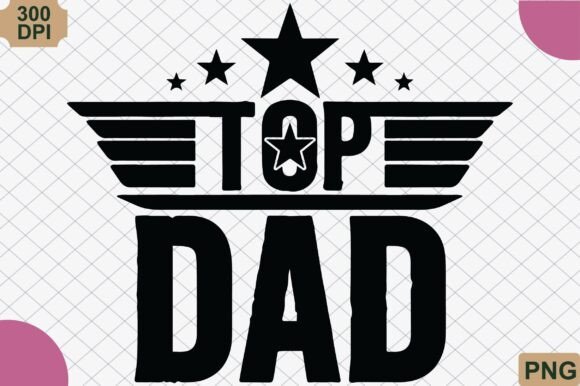
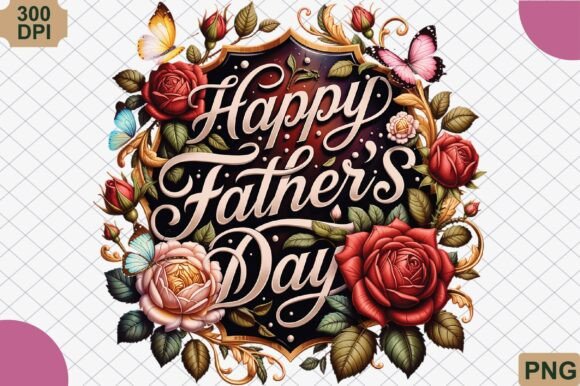
The appeal of a classic dad celebration design lies in its versatility. A clean, bold aesthetic featuring family icons like 👨👧👦💙✨ resonates because it is universally recognizable yet emotionally significant. When you select a high-resolution file with a transparent background, you eliminate the tedious task of manual editing, allowing you to focus on production. Yet, many creators rush this selection process, assuming that any image labeled "Father's Day" will suffice. This assumption is the first step toward a subpar product.
Common Pitfalls in Selecting Digital Clipart
One of the most frequent mistakes beginners make is ignoring resolution requirements. It is tempting to download a free or low-cost image from a quick search, but if that file is 72 DPI (dots per inch) instead of the industry-standard 300 DPI, the print quality will suffer significantly. On a small sticker, this might go unnoticed. However, when applied to a full-front t-shirt or a large sublimation mug, the pixelation becomes obvious. The image appears blurry or jagged, undermining the professional look you aim to achieve. Always verify that your Happy Father’s Day PNG is provided at 300 DPI to ensure crisp lines and clear text, regardless of the print size.
Another critical oversight involves the background. Many novice designers do not realize that a white background in a JPEG file is not the same as a transparent background in a PNG. If you place a JPEG with a white box around the design onto a colored shirt, you will print that white box, resulting in an unprofessional square patch rather than a seamless design. For sublimation and vinyl cutting, transparency is non-negotiable. Ensure your file is a true PNG with alpha channel transparency, allowing the design to float naturally over any fabric or substrate color.
Understanding Compatibility with Cutting Machines
For those using Cricut or Silhouette machines, the distinction between print-then-cut and simple vinyl application is vital. A standard PNG is excellent for sublimation printing, where the image is printed onto transfer paper and then heat-pressed onto the item. However, if you intend to cut heat-transfer vinyl (HTV), a PNG alone is insufficient. You will need to trace the image within your software or use an accompanying SVG file. Relying solely on a PNG for vinyl projects can lead to excessive weeding time and inaccurate cuts if the auto-trace feature misinterprets the edges.
To avoid this friction, check if the product listing includes multiple file formats. While this article focuses on the Happy Father’s Day PNG, knowing that the designer provides complementary formats can save hours of work. If you are strictly using sublimation, the PNG is your primary asset. Ensure your printer settings are aligned with the file’s color profile. Sublimation ink behaves differently than standard inkjet ink, and colors may shift if the design is not optimized for dye-sublimation processes. A design that looks vibrant on your screen may appear muted on fabric if the contrast and saturation are not adjusted correctly beforehand.
Evaluating Design Aesthetics for Target Audiences
Beyond technical specifications, the artistic style of the clipart plays a crucial role in sales and satisfaction. The "Classic Dad Celebration" theme suggests a timeless approach, avoiding overly trendy fonts or graphics that may date quickly. A clean, heartfelt family aesthetic appeals to a broad demographic, from young children buying their first gift to adult children honoring aging fathers. When evaluating a design, ask yourself: Does this convey warmth without being cluttered?
Overly complex designs with too many small elements can fail during the printing process. Fine lines may break up in sublimation, and small text can become illegible on curved surfaces like tumblers. The best Happy Father’s Day PNG files strike a balance between detail and simplicity. Bold typography paired with clear iconography ensures that the message is readable from a distance. This is particularly important for matching family apparel, where consistency across different sizes and garments is key.
Legal and Ethical Considerations for Resellers
If you are a small business owner or a print-on-demand seller, understanding licensing terms is essential. Purchasing a digital download does not automatically grant you the right to resell the file itself. Most licenses allow for personal use and small commercial use, meaning you can sell physical items printed with the design, such as mugs, shirts, or tote bags. However, you cannot redistribute the PNG file digitally. Always read the terms of service provided by the creator. Violating these terms can lead to account suspensions on platforms like Amazon Merch or Etsy, damaging your business reputation.
Furthermore, ensure that the elements within the design are original or properly licensed. Some free resources aggregate images from various sources without verifying copyright status. Using infringing content can result in legal action. Stick to reputable marketplaces where creators explicitly state their ownership and licensing permissions. This due diligence protects your business and supports the creative community.
Practical Steps for Best Results
To maximize the potential of your Happy Father’s Day PNG, follow these practical steps before starting your project:
- Inspect the File: Open the PNG at 100% zoom to check for pixelation or artifacts. Ensure the edges are smooth and the background is truly transparent.
- Test Print: Before committing to a large batch, perform a test print on a similar material. Check color accuracy and alignment.
- Adjust Settings: Calibrate your printer and heat press according to the substrate manufacturer’s guidelines. Sublimation requires precise time, temperature, and pressure.
- Consider Placement: Visualize how the design sits on the product. Centered designs work well for t-shirts, while wrap-around layouts suit mugs and tumblers.
- Backup Your Files: Keep organized records of your purchased assets and license agreements for future reference.
By paying attention to these details, you transform a simple digital file into a cherished keepsake. The goal is to celebrate the special bond between father and family with a product that reflects care and quality. A well-chosen Happy Father’s Day PNG simplifies this process, providing a solid foundation for creativity. Whether you are making a single gift for your dad or stocking your online shop for the holiday rush, prioritizing quality and compatibility ensures that your final output honors the occasion appropriately.
Remember, the ease of use offered by instant digital downloads should not compromise the thoroughness of your preparation. Take the time to understand your tools and materials. When you combine a high-quality, classic design with proper technical execution, the result is a professional-grade product that stands out in a crowded market. This approach not only enhances customer satisfaction but also builds your confidence as a creator. Embrace the simplicity of the design, let the technology do the heavy lifting, and focus on the emotional impact of the gift you are creating.